How do I search all my ChatGPT chats?
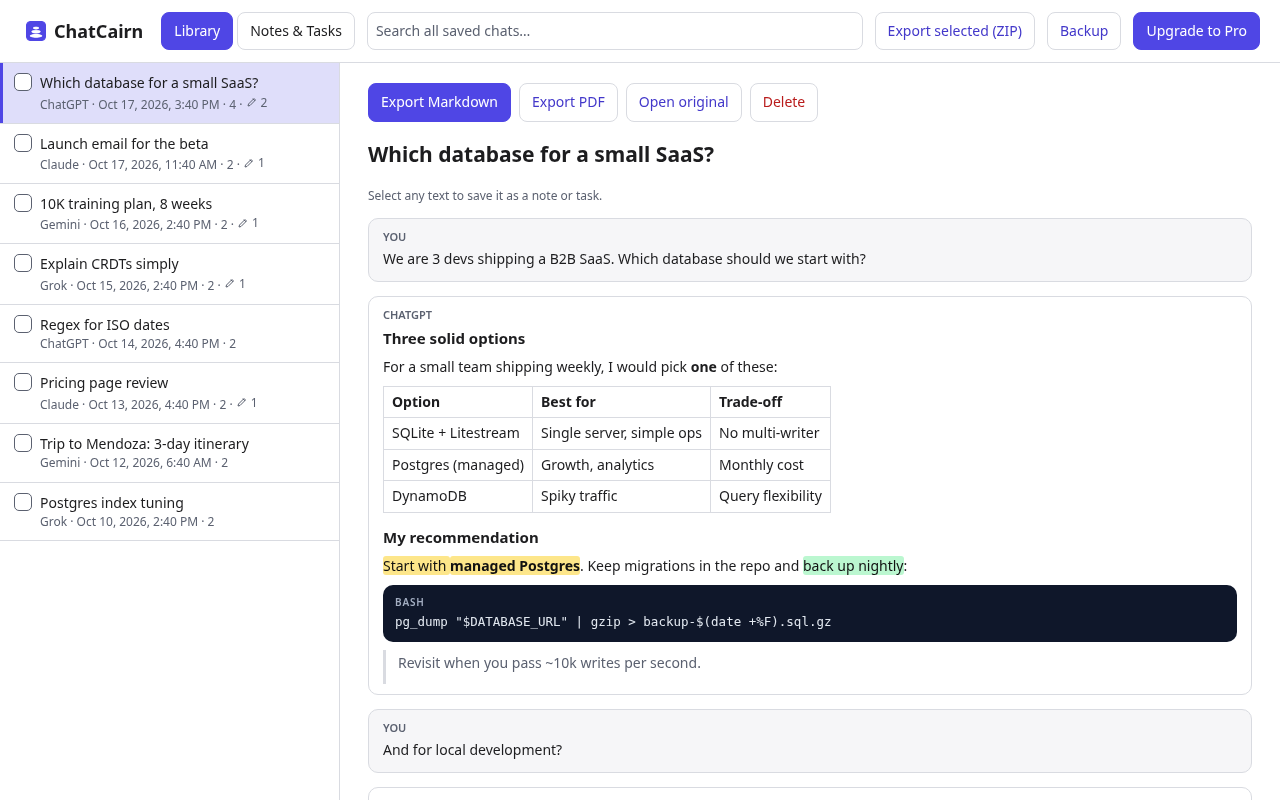
Save the chats you want to keep with ChatCairn: open a chat on chatgpt.com and click Save. Then use full-text search in the ChatCairn library. One search covers every chat you saved, from ChatGPT, Claude, Gemini and Grok together, and from Perplexity after you grant optional site access. It searches the chats you saved with ChatCairn. Free holds up to 30 saved chats; Pro has no chat cap. How to search old Claude chats.
How do I export a ChatGPT conversation to PDF?
Install ChatCairn for Chrome or Edge, open the chat on chatgpt.com and click Save. In the library, export it as a paginated PDF. PDF export is free; free exports carry a small "Made with ChatCairn" footer, which Pro can remove. How to export a ChatGPT chat to PDF.
Add to Chrome · Get it for Edge
How do I export ChatGPT chats to Markdown?
Install ChatCairn for Chrome or Edge, open a ChatGPT chat and click Save. In the ChatCairn library, export it as Markdown with YAML front matter. Free includes Markdown export, and the file is saved on your computer. ChatGPT and Claude to Obsidian.
Add to Chrome · Get it for Edge
How do I save and export Claude chats to PDF or Markdown?
Open the chat on claude.ai and click Save in ChatCairn. It goes into your local library next to your other AI chats. From there, export it as a paginated PDF or as Markdown with YAML front matter, and find it later with full-text search. How to search old Claude chats. How to export a ChatGPT chat to PDF.
How do I export a Gemini chat to PDF or Markdown?
Install ChatCairn for Chrome or Edge, open a Gemini chat and click Save. In the library, export it as a paginated PDF or as Markdown with YAML front matter. Free includes Markdown and PDF; Pro adds bulk ZIP export and can remove the export footer. How to export a Gemini or Grok chat to PDF.
Add to Chrome · Get it for Edge
How do I export Grok chats to PDF or Markdown?
Open the chat on grok.com and click Save in ChatCairn. In the library, export it as a paginated PDF or as Markdown with YAML front matter. Grok chats are searchable together with your ChatGPT, Claude and Gemini chats. How to export a Gemini or Grok chat to PDF.
How do I back up my ChatGPT chats?
Save the chats you want with ChatCairn; they stay in your browser. From the library you can make a JSON backup file and restore it later, or export single chats to Markdown or PDF. Pro adds a bulk ZIP export of your whole library.
Can I export all my saved AI chats at once?
Yes, with Pro: bulk ZIP export downloads your whole ChatCairn library in one file. It covers the chats you saved in ChatCairn.
Does ChatCairn work with Perplexity?
Yes. After you grant optional site access in the extension, ChatCairn saves the open Perplexity thread into the same local library, with the same search and Markdown, PDF and JSON options.
How do I back up my Custom GPTs and Gemini Gems?
Use GPT Rescue, free on every plan. It backs up the Custom GPTs and Gemini Gems you created to a ZIP on your computer. How to export your Custom GPTs and Gems.
Is my chat data private?
ChatCairn has no account. Your chats, notes and tasks stay in your browser, the extension has no analytics, tracking or ads, and no ChatCairn server receives your conversations.
See the privacy policy.
How does ChatCairn read a conversation?
When you click Save, it reads that chat. On ChatGPT and Claude it may make a read-only request to that same site for the conversation; Gemini, Grok and Perplexity are read from the page. A Pro license check sends only the key and an instance id to the Lemon Squeezy License API, never chat content.
Does ChatCairn work on Microsoft Edge?
Yes. ChatCairn is an extension for desktop Google Chrome and Microsoft Edge. The extension is in English, Spanish and Portuguese (Brazil).
Add to Chrome · Get it for Edge
What does ChatCairn Pro cost?
ChatCairn Pro is $4.99 per month or $69 one-time for lifetime (USD). Free covers up to 30 saved chats and 10 notes and tasks. Pro removes those caps, adds bulk ZIP export of your library and can remove the export footer. One key activates up to 3 browsers.
See pricing.
Where do I find my license key?
Your license key is sent by email after purchase. Paste it in ChatCairn to activate Pro.
Can I get a refund?
Yes, within 14 days of purchase, on request. Email lgdventures.hq@gmail.com.
 ChatCairn